
Discord
Noctalia supports multiple Discord client alternatives that can be themed.
Supported Clients
Section titled “Supported Clients”- Vesktop - Modern Discord client
- WebCord - Privacy-focused Discord client
- ArmCord - Lightweight Discord client
- Equibop - Discord client
- Lightcord - Discord client
- Dorion - Discord client
- Vencord - Discord client
-
Install your preferred Discord client:
Terminal window # Example for Vesktop (Arch Linux)paru -S vesktop -
Enable Discord theming in Noctalia:
- Open Settings → Color Scheme → Templates → Programs
- Toggle on Discord
-
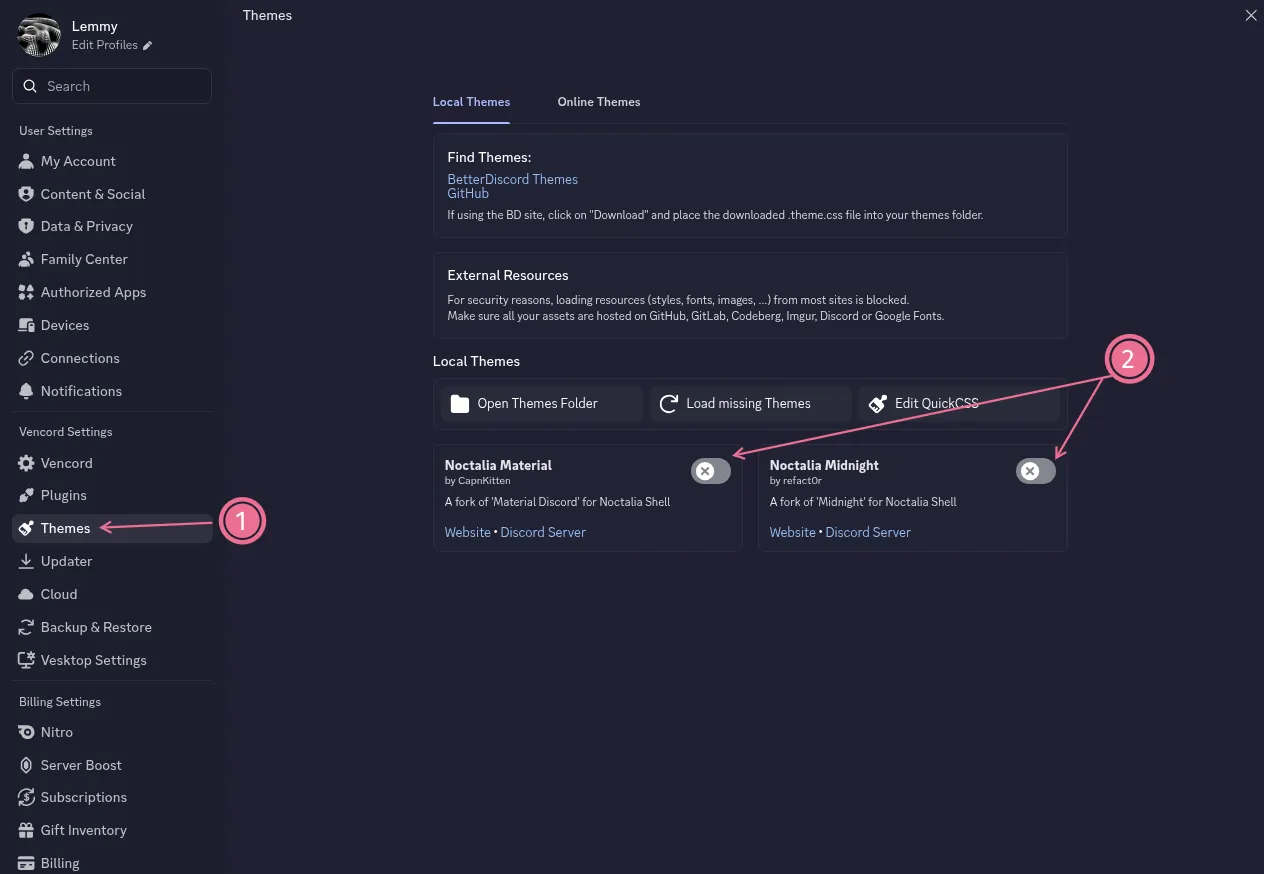
Enable theme in Discord:
- Open your Discord client
- Go to Settings → Themes
- Toggle one of the two available Noctalia themes
Troubleshooting
Section titled “Troubleshooting”- Theme not appearing: Make sure you’ve enabled the theme in Discord settings
- Colors not updating: Restart your Discord client after changing color schemes
- Client not supported: Check that your Discord client is one of the supported alternatives
- Theme looks broken: Ensure you’re using a supported Discord client and have the latest version
Additional Notes
Section titled “Additional Notes”The theme will automatically update when you change color schemes in Noctalia.