
GTK and Qt Applications
This guide covers theming applications built with GTK, Qt, and KDE Plasma toolkits.
GTK 3/4 Applications
Section titled “GTK 3/4 Applications”GTK applications include most GNOME apps and many Linux applications. Noctalia can automatically theme them using the adw-gtk3 theme.
-
Install required packages:
Terminal window # Arch Linux / Manjaroparu -S adw-gtk-theme nwg-look# Other distributions# Install adw-gtk-theme and nwg-look from your package manager -
Apply the GTK theme:
-
Using nwg-look (recommended):
- Open
nwg-look - Select
adw-gtk3from the theme list - Click “Apply”
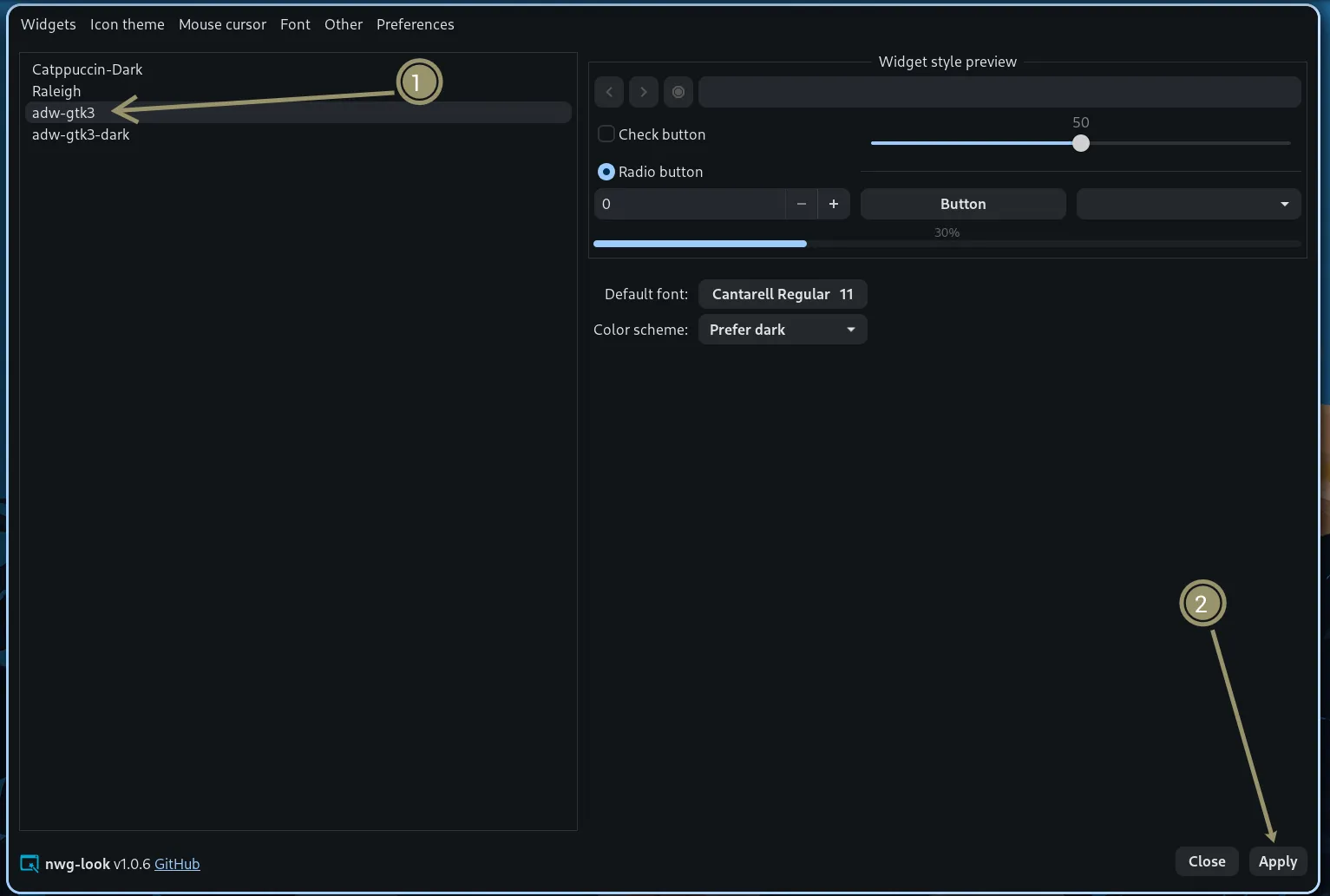
- Open
-
- Using command line:
Terminal window gsettings set org.gnome.desktop.interface gtk-theme 'adw-gtk3'
- Enable GTK theming in Noctalia:
- Open Settings → Templates
- Toggle on GTK 3 and/or GTK 4
Enabling those built-in templates writes noctalia.css and runs the shipped
apply.sh
post_hook (bash '…/gtk/apply.sh' dark|light). That script imports
noctalia.css into gtk.css and syncs adw-gtk3 / adw-gtk3-dark plus
org.gnome.desktop.interface.color-scheme. A theme mode change re-applies the
templates, so the same full hook runs again — you do not need a separate hook
for that path.
Optional: appearance sync without GTK templates
Section titled “Optional: appearance sync without GTK templates”If you are not using the GTK templates but still want GNOME’s
color-scheme preference updated on dark/light switches, add a
theme_mode_changed hook with --appearance-only
(skips the CSS import and does not change gtk-theme):
[hooks]theme_mode_changed = "/usr/share/noctalia/assets/templates/gtk/apply.sh --appearance-only $NOCTALIA_THEME_MODE"Use /usr/local/share/noctalia/... instead if you installed with Meson’s default prefix.
$NOCTALIA_THEME_MODE is set by the hook (dark or light). Switching
color-scheme can flash some apps (browsers especially); keep this opt-in.
Troubleshooting
Section titled “Troubleshooting”- Theme not applying: Completely restart GTK applications (close and reopen)
- Some apps still look wrong: Some GTK apps may need GTK 4 theme separately:
Terminal window gsettings set org.gnome.desktop.interface gtk-theme 'adw-gtk3'gsettings set org.gnome.desktop.interface color-scheme 'prefer-dark' # or 'prefer-light' - Flatpak apps: Flatpak apps may need the theme installed in their sandbox:
Terminal window flatpak install org.gtk.Gtk3theme.adw-gtk3-darkflatpak install org.gtk.Gtk3theme.adw-gtk3
Qt Applications
Section titled “Qt Applications”Qt applications include KDE apps and many cross-platform applications. KDE apps (Dolphin, KDE Connect) require the use of a KColorScheme, and so this is the preferred way to theme QT applications. Use of a normal QT theme instead of a KColorScheme can cause colors to appear incorrectly or unreadable when running KDE apps. If KDE apps are not used, then the normal QT theme can be used instead.
-
Install an application that allows you to apply QT/KColorScheme themes: While the setup steps will go through the process of using
qt6ct-kde, there are multiple options available.- qt6ct (
qt6ct-kdewith the KDE patches)Terminal window # Arch Linux / Manjaro / CachyOSparu -S qt6ct-kde - qtengine (https://github.com/kossLAN/qtengine)
- hyprqt6engine (https://github.com/hyprwm/hyprqt6engine)
- qt6ct (
-
Set environment variable: Add this to your window manager configuration or shell profile:
For Niri (
config.kdl):environment {QT_QPA_PLATFORMTHEME "qt6ct"}For Hyprland (
hyprland.conf):env = QT_QPA_PLATFORMTHEME,qt6ctFor Sway (
config):Terminal window setenv QT_QPA_PLATFORMTHEME qt6ctFor shell profile (
~/.bashrcor~/.zshrc):Terminal window export QT_QPA_PLATFORMTHEME=qt6ct -
Enable the KColorScheme (or QT theme) in Noctalia:
- Open Settings → Templates
- Toggle on KColorScheme (or Qt)
- Configure qt6ct:
- Run
qt6ctfrom terminal - In the Appearance tab, there will be a dropdown for “Color scheme:”
- In the dropdown select
noctalia (KColorScheme)if using a KColorScheme for KDE app compatibility, ornoctaliafor a normal QT theme without the need for KDE app compatibility. - Click Apply and OK
Troubleshooting
Section titled “Troubleshooting”- Qt apps not themed: Ensure the environment variable is set before launching applications
- qt6ct not found: Make sure qt6ct is installed and in your PATH
- Theme not updating: Restart Qt applications after changing color schemes
- “The application is not configured correctly”: If opening qt6ct states this, it is likely that the
QT_QPA_PLATFORMTHEMEenvironment variable is not correctly set toqt6ct(Note: This may require a reboot if you set it for the first time).
KDE Plasma (KColorScheme)
Section titled “KDE Plasma (KColorScheme)”If you’re using KDE Plasma, Noctalia can apply colors through the native KColorScheme system.
- Enable KColorScheme in Noctalia:
- Open Settings → Templates
- Toggle on KColorScheme
- Apply in KDE System Settings:
- Open System Settings → Appearance → Colors
- Select the
noctaliacolor scheme - The scheme will update automatically when you change colors in Noctalia
Troubleshooting
Section titled “Troubleshooting”- Scheme not appearing: Restart KDE Plasma or log out and back in
- Colors not updating: Ensure KColorScheme toggle is enabled in Noctalia settings